
Skip to content

Guitar Fretboard Notes and Interval Trainer

Learn the Fretboard Easily

FretGenius is a guitar fretboard trainer that helps you learn every note and every interval in just 5 minutes a day.

Free to start, with a free trial of FretGenius Pro. Cancel anytime and keep the free features and every lesson.

  • Note Path
  • Interval Path
  • Real-guitar feedback
  • Short guided lessons
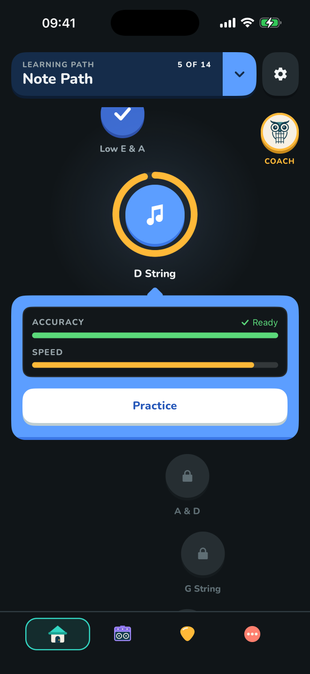
FretGenius guitar fretboard trainer showing the guided Note Path

Master the Fretboard with Learning Paths

Step-by-step guidance

Learn to find notes and intervals anywhere quickly

Note Path

Know every note on the fretboard

Build reliable note recall from open strings to the full neck. Practise with Note Finder, Name That Note, the Mic Note Trainer, and Play Along.

  • ● Guided fundamentals and bite-sized lessons
  • ● On-screen and real-guitar practice modes
  • ● Accuracy, pace, improvement, and speed-map feedback
Interval Path

Visualize and navigate the neck

Learn how two notes relate, recognize interval shapes in every direction, and turn those shapes into a practical map for chords, triads, and melodies.

  • ● A guided curriculum from interval basics to triads and chords
  • ● Interval Finder for visual fretboard practice
  • ● Mic Interval Trainer for playing shapes on your guitar

A complete learning experience

Practice using your real Guitar or Screen Quizzes

Small phases so you can make progress every day and get feedback from your AI Coach

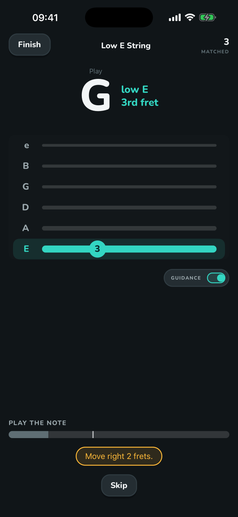
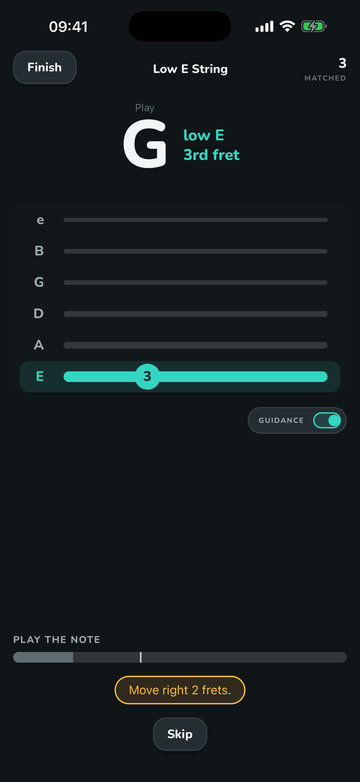
Real-time microphone guidance in the FretGenius fretboard trainer

Hear it

Play a note. Get useful guidance.

The microphone trainer listens to your guitar, confirms matches, and can guide you toward the target fret.

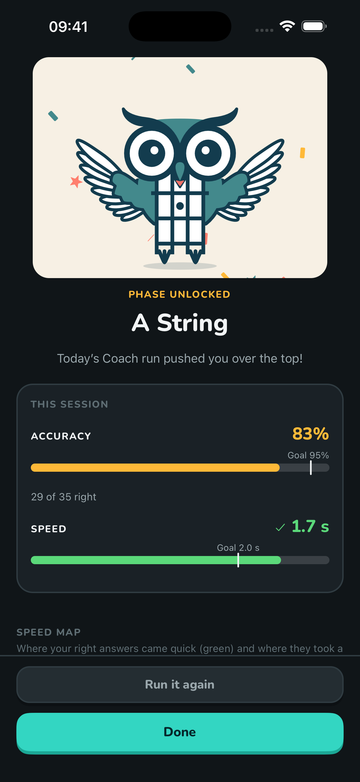
FretGenius fretboard trainer session summary with accuracy, pace, improvement, and speed map

See it

Turn each session into a next step.

Review accuracy, response pace, recent improvement, and a fretboard speed map that reveals where your weak spots are.

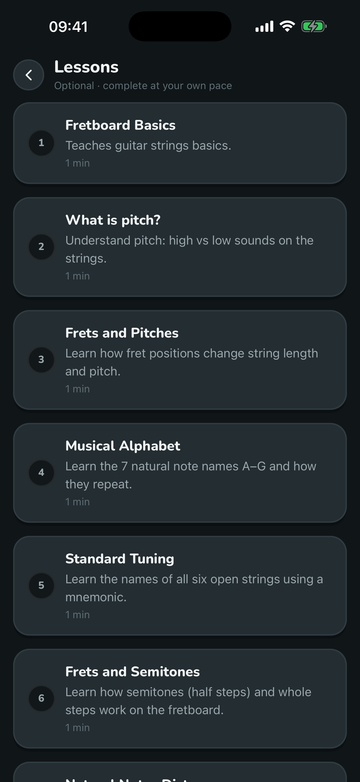
Short guitar fretboard lessons inside FretGenius

Understand it

Quick and hands-on lessons.

Short lessons cover fretboard basics, pitch, tuning, semitones, intervals, shapes, and the building blocks behind chords.

Personalized Learning

A fretboard trainer that adapts to you

Owlfred, your AI coach, analyzes your practice sessions and gives you personalized daily practice exercises.

Explore the guitar fretboard trainer

Choose your mode

Use on-screen recall, microphone training, Play Along, or interval-shape practice.

Follow a curriculum

Note Path and Interval Path give your practice a clear direction.

Daily Coach Exercises

Your coach suggests what you should practice next.

Make Progress Every Day

Practice anywhere, even without your guitar.

Why we think FretGenius is the best Fretboard Trainer for you

It is the only app that guides you like a real coach: it builds a personalized practice plan, analyzes your history, finds what you need to improve and only lets you advance once you've truly learned it. Real-guitar and screen practice both count toward your progress. Play Along makes practicing musical and fun. Short animated lessons help you easily understand concepts that are hard to visualize in traditional lessons. We provide a carefully planned progression, instead of throwing a bunch of exercises at you and hoping you will figure it out on your own.

Check out our competitor comparison
  • An AI coach that builds your personalized practice plan every day
  • It finds what's slowing you down and targets it
  • You advance only when you've shown both accuracy and speed
  • Screen and real-guitar practice count toward the same progress
  • Play Along makes your practice fun and trains your ear
  • A guided Interval Path, with clear animated shape lessons

From the App Store and Google Play

What guitarists say

★★★★★

“FretGenius is the best fretboard trainer app I found… It offers a gamified experience that is addicting and actually makes me practice every day.”

— Marko Zecevic

Google Play

★★★★★

“I have spent the last 2 years or so trying to memorize the fretboard using different techniques from YouTube guitar teachers, and they all only led me to memorize patterns and not actually learn the notes. After using this app regularly, I am pretty close to having the whole fret board memorized!”

— Bobthetiger11

App Store 🇨🇭

★★★★★

“This app has been pivotal in my memorization of the fretboard notes. The play along with your guitar mode is extremely fun, and when you hear the synchronization with the chord you are playing on top of is beautiful.”

— Joshua D

★★★★★

“FretGenius is truly genius. I already know the fretboard pretty well but FretGenius has helped me narrow in on some trouble spots I wasn't even aware of… Try this amazing app and see for yourself.”

— Jim

Google Play

★★★★★

“I've struggled to learn the names of the notes on my fretboard for ages but this gamified approach has worked where repetition has failed.”

— PatrickDale

★★★★★

“Structured learning, didactic and simple. Clear and playful path to progressively learn the fretboard in small daily doses.”

— claudbe0033

★★★★★

“Their method tells me that they truly understand how learning and effective long term memorization works. As a psychologist myself I'm really impressed.”

— 4dimensionen

App Store 🇩🇪

★★★★★

“I have been playing the guitar for an embarrassing amount of time without ever getting comfortable quickly finding notes on the fretboard. In just an hour I can tell I have already improved drastically. Wish I found this a long time ago.”

— Eddy Spaghetti

Google Play

★★★★★

“Excellent approach to learning the fretboard. The play along version is a great way to build up recall speed on the instrument as well as train your ear to hear the correct notes. The phase progression is set up to be challenging enough but not so that it seems out of reach.”

— John Janani Grant

Google Play

★★★★★

“I started by using the free website then decided to buy the app… Absolutely worth it. The option to play the notes on the guitar while using the mic is amazing. The lessons on music theory are well done as well. Can't wait to keep unlocking levels.”

— DstnFlrn

App Store 🇺🇸

★★★★★

“I practice note navigation a few times a day with this app. I'll even do it waiting between a set at the gym to kill 2 minutes and test my brain.”

— Kinetic Bear

App Store 🇺🇸

★★★★★

“Really useful. The app guides you step by step in the learning of the guitar fretboard, without rushing but building self awareness.”

— Lupo Solitario

Google Play

★★★★★

“The best among fretboard memorizing apps I could find on the App Store. Highly recommended. Works seamlessly and does exactly what it is supposed to do.”

— LB_0016

App Store 🇩🇪

Fretboard Mastery Awaits You

Download now and finally learn the fretboard

Start your fretboard training today

Free to start, with a free trial of FretGenius Pro. Cancel anytime and keep the free features and every lesson.

Questions before you download

What is free, how the trial works, and whether FretGenius fits your guitar and your level.

Pricing and free trial

Is FretGenius free?

Yes. You can use these features without a subscription:

  • Note Finder
  • Name That Note
  • Play Along
  • Heatmap
  • Scale Explorer
  • Every lesson in the Note Path and the Interval Path

These features are part of FretGenius Pro:

  • Mic Note Trainer (practice with your real guitar)
  • Interval Path practice
  • Daily Coach

When you install the app, a free trial of FretGenius Pro starts. You can cancel at any time and keep using all the free features, including every lesson. You only lose the Pro features.

How does the free trial work?

A free trial of FretGenius Pro starts when you install the app, so you can try everything before you decide. If you do not want to continue, cancel at least a day before the trial ends and you will not be charged. The free features, including every lesson, keep working after you cancel.

How do I cancel the trial or subscription?
  • Android: open the Google Play Store, tap your profile picture, then Payments & subscriptions, Subscriptions, FretGenius, Cancel subscription.
  • iPhone and iPad: open Settings, tap your name, then Subscriptions, FretGenius, Cancel Subscription.

On Android you can also cancel from the reminder email that Google Play sends.

Will I be reminded before I am charged?

Yes. Google Play sends an email before your trial ends, with an option to cancel. The App Store sends notifications too. FretGenius can also send its own reminder if you turn on trial reminders in the app.

Can I get a refund?

Yes. Contact [email protected] and we will sort it out.

Is there a free web version?

Yes. If you only want on-screen quizzes and the heatmap, use our browser site fretboardquiz.com. To practice with your real guitar or use Play Along, Daily Coach and the learning paths, install FretGenius.

Is FretGenius right for me?

Do I need a guitar for every activity?

No. Note Finder, Name That Note, Interval Finder, Scale Explorer, the Heatmap and the lessons all work on screen. The microphone trainers and Play Along use your real guitar.

Is FretGenius suitable for beginners?

Yes. The Note Path starts with the open strings and natural notes and introduces new notes in short, focused steps. You do not need any music theory to begin. When you install the app, a few questions about your playing place you at the right phase for your level.

Is FretGenius useful for advanced players?

Yes. Even experienced players usually have slow spots on the fretboard. FretGenius finds them and helps you speed them up. The Interval Path also teaches interval shapes that most players never practice deliberately. Its lessons are free, and its practice is part of FretGenius Pro.

Which instruments and tunings are supported?

The learning paths support guitar in standard tuning for now. The standalone microphone trainers for notes and intervals (Pro) show only the note name or the interval and accept it in any octave, so they also work with bass, ukulele and other stringed instruments.

Does the microphone work with an electric guitar?

Yes. An unplugged electric guitar is quiet, though, so the microphone picks up more background noise. Practice in a quiet room with your phone very close to the guitar. An amp helps too.

Does the app include sharps and flats?

Yes. You start with the natural notes. Once you have learned those, you practice the full fretboard with sharps and flats.

More about unlocking phases, resetting progress, note detection and what is coming next in the full FAQ, or email [email protected].